Category: Rategenie

  • Rategenie Tactics for COVID-19

    Rategenie Tactics for COVID-19

    With the current COVID-19 pandemic, things are changing rapidly. The COVID-19 outbreak is expected to have a wide-ranging impact on tourism and travel in general. It’s important to note that the impact of COVID-19 has been quite localized as of mid-March.

    So far, the rental markets impacted the most are the places with the most cases of the virus. With that said, our engineering team is continuously monitoring all the changes in your market. For now, we recommend the following Rategenie tips to help you increase the chance of getting bookings for the next few months.

    Adjusting your Rental Rate settings

    One way to account for this is temporarily decreasing Base rate for your rentals until the market recovers. To learn more about it, check read our help guide about Rental rate settings

    Adjust your Rates using Date Specific Rule

    You would like to adjust your rates so that you can increase your chances of booking in this current crisis. We recommend that you set a lower custom rate for April,May, June  through Date specific Adjustments until the situation gets back to normal.  To learn more about it, check out our help guide about Date Specific Adjustment Rule.  

    Lower the Minimum Night stays to 1 night

    Lower the minimum night stays to 1 night (if your operation setup can accommodate this). You can set the min night stay to 1 night for each day by following our help guide about Min Nights Rule.

    Length of stay discounts

    Since the start of the COVID-19 crisis, there has been a global shift from short to long bookings. So, we are recommending to all of our property managers to consider a substantial length of stay (LOS) discounts – Both Weekly and Monthly discounts can be set on the connected channels. Please note, LOS discounts are applied on top of Rategenoie rates recommendations.  

    Adjust Last Min Rule and cancellation policy

    To adjust for the short-term demand reduction without sacrificing future gains, we recommend reducing the “Minimum Stay for Last Minute Bookings” to “1-day minimum within the last 60 days”. For more information visit our Last Min adjustment rule guide. Additionally, relaxing the Cancellation Policy can also make the listing more attractive to a wider audience – Please note that this configuration has to be done directly in the booking channel. You can read more about Airbnb cancellation policy by clicking here.

    Adjusting Special Events Rule

    Although many events have been canceled due to the current crisis. In this situation, you might still want your rates to be adjusted depending on the Public holidays in your region, you can only select Public holidays as event type while selecting events for your Special Events rule. Also, you would like these public holidays to take less impact,  in this case we recommend you to set impact as ‘passive’. To learn more about events, please visit our help guide about Special Events Rule.

  • Competitive Vacation Rental Revenue Management

    Competitive Vacation Rental Revenue Management

    As a vacation rental manager, you’re probably already familiar with the ferocity of this market and how quickly it changes. That’s why it’s important to have your finger on the pulse – when things do change, you’ll be ready to adapt. Right now, there’s a change going on and we’d like you to be prepared.

    Take a few minutes to educate yourself on revenue management, dynamic pricing strategies, and the software that’s elevating the VR industry’s level of competition.


    What is Revenue Management?

    Of course, if you’ve come across this article searching for VR revenue management or dynamic pricing information, you already have an idea. But for the unacquainted, let’s get up to speed on revenue management:

    “Revenue management is the application of disciplined analytics that predict consumer behaviour at the micro-market levels and optimize product availability and price to maximize revenue growth.”

    Wikipedia

    So, when we speak about revenue management, we’re speaking about controlling and improving your income using consumer data. Now, this definition can mean different things for different industries, but in the vacation rental industry, the process simply involves changing your rental rates to respond to market fluctuations or predictable customer behavior. You’ll see it referred to as dynamic pricing strategies or dynamic rates.

    Here’s a few simple scenarios:

    1. You offer your rental unit for a flat nightly fee, year-round. This is not a dynamic pricing strategy.
    2. You increase your rates by 10% for Saturdays and Sundays. This is a common strategy that, while fixed, is still in the vein of revenue management. You are adjusting your value for predictable market changes.
    3. You increase your rates by 20% for an upcoming local music festival. We’re getting closer to something your boss might call “proactive management”. Or some sort of buzzword of that nature.
    4. You offer 10% discounts to customers who book a month in advance because you’ve noticed they tend to have longer bookings and generate more money. Now you’re abiding by the tenets of revenue management.

    If you already do all of these things, that’s excellent. But don’t stop reading yet – the purpose of this article wasn’t just to give you a name for your methods. It’s to teach you about how your competitors are using them – and how you can level the field again.


    How Dynamic Pricing Has Evolved

    The example scenarios above were pretty straightforward. But considering there’s a long list of rate-changing factors that need to be considered simultaneously, operating a dynamic pricing strategy in the VR industry is virtually impossible without software help.

    [image src=”https://blog.rategenie.io/wp-content/uploads/2019/03/RG-Genie-Strategy-08.png” link=”true” style=”width:100%;max-width:500px;margin-left:auto;margin-right:auto;”][lightbox]

    All of the following may be considered at once for setting a single night’s rate:

    • Seasonal market fluctuations
    • Competitor rates
    • Local availability
    • Local tourism surges, events, holidays
    • Booking parameters (time of booking, length of stay, number of guests, etc)

    How do you account for all of this…every day? Enter dynamic pricing tools like Rategenie, Pricelabs, or AirDNA’s Market Minder. They each, in their own ways, take into account varying availability, competitor, and customer factors to calculate the most effective rates for your rental units.

    Right now, chances are that some of your competitors have a complex price calculation system based on numerous sources of deep market research set up to work against you. They aren’t struggling to come up with the perfect price every day either – just paying a monthly fee.

    In most competitive skirmishes, there’s usually a creative way to respond to your opponents’ moves. But in scenarios where your competitor has taken steroids, and is now significantly faster, smarter, and more informed than you, refer to the age-old adage: if you can’t beat ‘em, join ‘em.

    Affordable dynamic pricing software is here now, and the VR industry is not going to turn back on it. Over the coming months, you can be assured that the number of companies offering rate calculation solutions is going to increase drastically.

    Does that mean you can’t compete at all anymore? Will you go out of business immediately? No – you may have a fantastic property with objectively great rates. Quality and availability are still the primary influences in booking. But things are going to get harder as more people get on board with dynamic pricing.


    So now you’re sufficiently up to speed on how dynamic pricing software is currently changing the vacation rental industry. There’s a number of benefits that come along with software like Rategenie that we haven’t even spoken about yet, such as increased efficiency and, of course, increased revenue.

    According to Rategenie’s case studies, users regularly experienced 30%+ increases in revenue after adopting a dynamic pricing strategy. If maintaining distance between yourself and your competitors isn’t a concern of yours, surely a significant increase in earnings is. You can read more about Rategenie’s earning potential in this case study.

    To learn more about dynamic pricing software, be sure to check out this article along with Rategenie’s feature breakdown.

  • Case Study – 3 Months of Rategenie

    Case Study – 3 Months of Rategenie

    With a little help from a few of our dedicated users, we’ve been able to document Rategenie’s performance over a healthy spread of varying locations, rental types, and periods of time.

    Our very first case study is finally ready after hitting the 3-month mark we’d planned for, and the results are as good as we could’ve hoped for!

    Christian Peters was gracious enough to open his books and provide us with all the data needed to track Rategenie’s effectiveness. The subject is a beachside studio apartment on the Caribbean cost of Mexico (Playa del Carmen).

    Mr. Peters says the apartment has year-round use, but Rategenie has still made a significant impact on revenue & occupancy. Let’s take a look at some of the numbers and see:

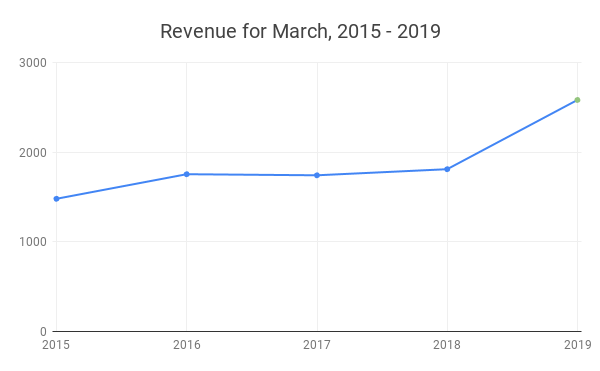
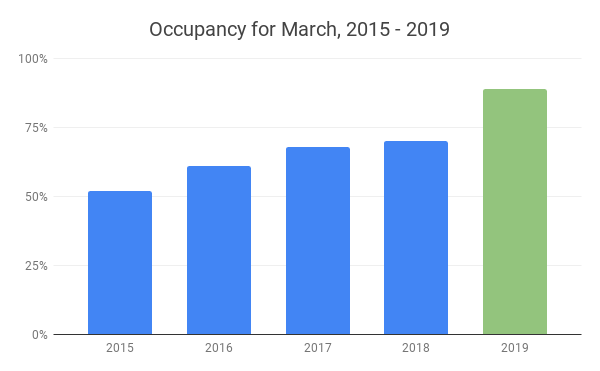
    March 2019 is the first month that Rategenie was implemented by Mr. Peters.
    So far, the year-over-year improvements are significant – but what about monthly?

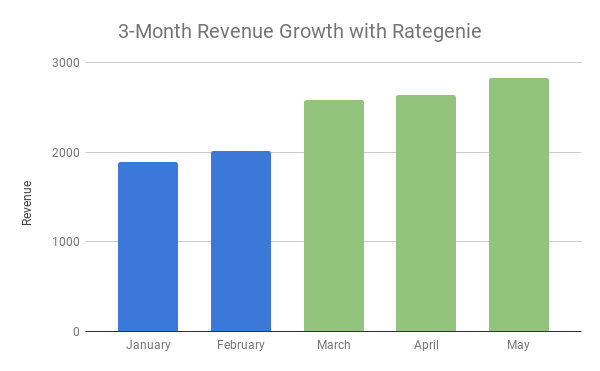
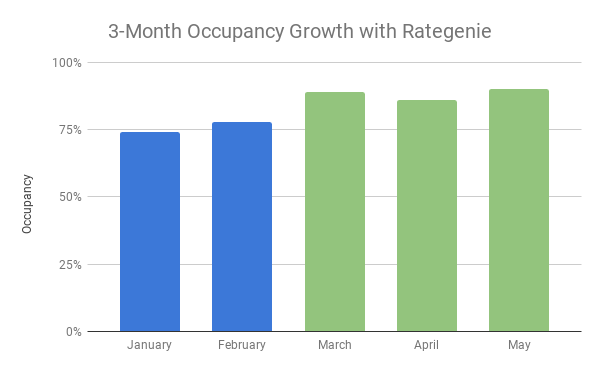
    Of course, there’s a number of factors that could have contributed to the sudden spike of activity this year, which is why we’re thorough enough to perform month-by-month tracking to observe any sharp trends:

    Rategenie came into effect in March and remains in use – we are only interested in the first three months for this study.
    An interesting trend indeed!

    As we can see, Rategenie isn’t just generating more revenue by increasing occupancy. The calculations and adjustments the app performs on a daily basis are in response to competitor rates, local events, seasonal queues, and any strategic rules you may have put in place.

    In this case, Mr. Peters is using the standard Genie Strategy. It’s performing all of the work for him, there’s no extra thought required.

    This disconnect between the occupancy & revenue trend lines is a healthy one – it means that Rategenie is ensuring your property is valued correctly, that your rates are responding to market and competitor changes.

    For the course of this study, Rategenie’s Advanced Booking Adjustment Rule was not used – it allows users to increase their occupancy with flexible pricing rules and be selective about the kind of bookings you receive.


    We’ll continue to check in on Mr. Peters throughout the year, as well as a few other case study subjects we have yet to publish!

  • Rategenie Mobile Available Now

    Rategenie Mobile Available Now

    We’re pleased to announce that the Rategenie Mobile App is now available for download for Android and iOS devices!

    (more…)
  • Expedia’s Pricing Models

    Expedia’s Pricing Models

    Expedia is one of the most recognizable brands in online travel booking, and a valuable channel for hoteliers and VRMs alike. While they don’t have the same vacation rental market share as Airbnb or Booking.com, their reach is significant enough to warrant your attention.

    (more…)
  • Fill More Of Your Calendar With Advanced Bookings

    Fill More Of Your Calendar With Advanced Bookings

    Rategenie’s Advanced Booking Adjustment Rule lets you adjust the nightly pricing for dates far in the future. This will allow you to more easily fill out your calendar for the year.

    Using this rule is a cinch – but let’s take a look at what goes on behind the curtains when you enable it.


    What is an advanced booking?

    An advanced booking is a booking far into the future, usually six months or more into the future.

    Because there is so much extra time between the current date, and when an advanced booking is made, there is a lot of flexibility in pricing strategies. It’s possible to not only increase appeal, but also revenue, by mandating a longer length of stay requirement.

    Guests are more likely to schedule a longer stay far in the future, as there is more time to plan the vacation and schedule leave from work.

    One common practice is to create a discount far in the future and couple it with a longer minimum night stay requirement. This creates a situation where a guest might be willing to book a longer stay in your room at a discounted rate. The slightly reduced nightly rate is offset by the increased number of nights per booking, thus increasing overall revenue.

    The Advanced Booking Adjustment Rule is completely automatic – you just set the parameters and let Rategenie do the thinking.


    How does the Advanced Booking Adjustment Rule work?

    Making an advanced booking adjustment is a lot simpler than it may sound.

    The Advanced Booking Adjustment Rule can be enabled when creating (or editing) a rate strategy.

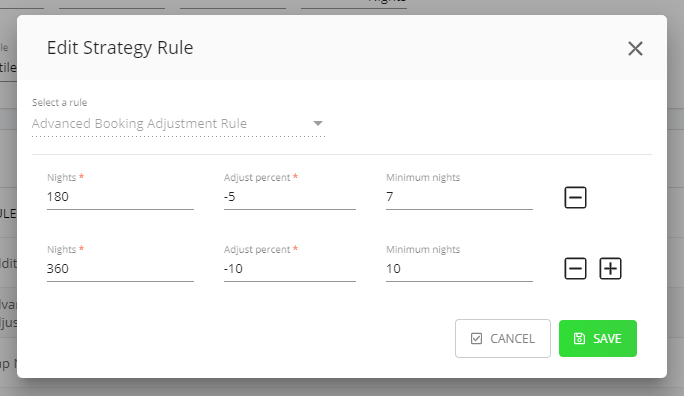
    Three fields can be completed for each line item in this rule:

    • Nights – This represents the number of nights into the future that you want to start applying this adjustment. The rule will apply to all future nights starting from the number of nights specified. If you enter a value of 180 nights, the adjustment will apply to 180, night 181, and so on..
    • Adjust percent – This represents the positive or negative percentage adjustment that will be made to the nightly rate, when this rule adjustment is applied. Insert a negative  sign in front of the number to apply a negative adjustment, or discount.
    • Minimum nights – The value entered here is optional, and it allows the minimum night requirement to override any lower-ranking rules adjustments made on the same calendar date. To read more about the minimum night stay hierarchy, please check out the Rategenie Blog to learn more about how your rates work.
    The Advanced Booking Adjustment page (found in your strategy settings).

    In addition to those fields, there are also plus (+) and minus (-) buttons that allow you to add more line items to the rule. For the example above, the first line of the rule will apply a 5% discount to nights 180 through 359. It will also apply a 7 night minimum stay requirement for bookings on those nights, assuming there is not a higher-priority rule already applied to the same dates.

    The second line will apply a 10% discount to night 360, night 361, and so on, as the previous 180 nights already have a discount applied. The 10 night minimum stay requirement for bookings on those nights, assuming there is not a higher-priority rule already applied to the same dates.

    Once the rule is saved, Rategenie will work its magic. Filling your calendar was never so simple.

    Using Rategenie’s Advanced Booking Adjustment Rule will ensure you maximize your occupancy in the near term.

  • Get Booked Tonight With Rategenie

    Get Booked Tonight With Rategenie

    The Last Minute Adjustment Rule in Rategenie allows your rate strategy to adjust your nighty rates up or down for future dates, starting from tonight. Its main purpose is to increase the appeal of your unbooked nights, even as the clock ticks down.

    While Rategenie’s rules are simple to apply, we figured you might want to know what’s going on under the hood (so to speak). So let’s take a look!


    What is a last minute adjustment?

    As the name suggests, the Last Minute Adjustment Rule adjusts your rental’s rates for immediately approaching dates. That’s tonight, tomorrow night, and so on, outward for the number of nights specified in the rule.

    Due to the close proximity of these dates, these nights are notoriously difficult to rent out. Not only is there less time available to generate effective marketing for these nights, but there is also a smaller pool of available guests that book rooms at the last minute.

    To boost the appeal of your room, it’s common practice to lower the nightly rate for these upcoming night. Doing this for one rental already requires vigilance and a daily commitment of time in order to make this modification across all connected channels. Now multiply this out over multiple rentals, and you’ll be costing yourself money just in lost productivity alone. Why not let Rategenie handle this for you?

    The Last Minute Adjustment Rule is completely automatic – you just set the parameters and let Rategenie do the thinking.


    How does the Last Minute Adjustment Rule work?

    Creating a last minute adjustment couldn’t be simpler.

    The Last Minute Adjustment Rule can be added when creating (or editing) a rate strategy.

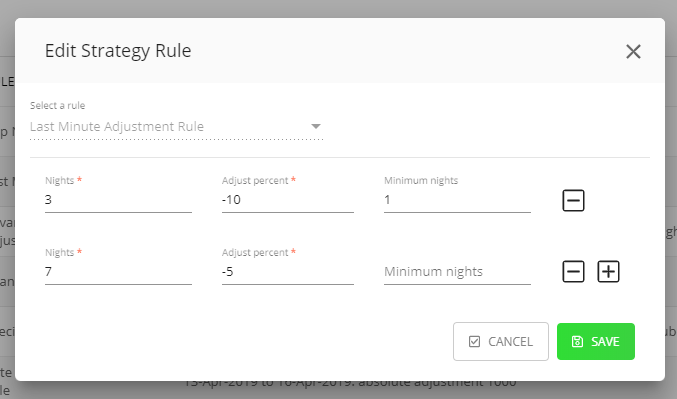
    There are three fields that can be filled:

    • Nights – This will determine the number of nights, starting from tonight, that will have their rates adjusted by Rategenie. If you enter a value of 3 nights, the adjustment will apply to tonight’s rate, tomorrow night’s rate, and the rate for the night after that.
    • Adjust percent – This represents the positive or negative percentage adjustment that will be made to the nightly rate, when this rule adjustment is applied. Insert a negative  sign in front of the number to apply a negative adjustment, or discount.
    • Minimum nights – The value entered here is optional, and it allows the minimum night requirement to override any lower-ranking rules adjustments made on the same calendar date. To read more about the minimum night stay hierarchy, please check out the Rategenie Blog to learn more about how your rates work.
    The Last Minute Adjustment rule page (in your rate strategy settings).

    In addition to those fields, there are also plus (+) and minus (-) buttons that allow you to add more line items to the rule.

    For the example above, the first line of the rule will apply a 10% discount to tonight, tomorrow night, and the night after that. It will also apply a 1 night minimum stay requirement for bookings on those nights, assuming there is not a higher-priority rule already applied to the same dates.

    The second line will apply a 5% discount 4 to 7 nights from now, as the first 3 nights already have a discount applied. As there is no minimum night stay set in the second line, the highest ranking minimum night available for the date will be used.

    Save the rules, and Rategenie will work its magic. Increasing your last-minute occupancy has never been easier.

    Using Rategenie’s Last Minute Adjustment Rule will ensure you maximize your occupancy in the near term.

  • Rategenie’s Impressive Response Time

    Rategenie’s Impressive Response Time

    When you make a change to your rate strategies or rental rate settings, you want to see the results of that change immediately. With Rategenie, there’s no waiting around – adjustments are queued up and pushed to your channels in record time!


    How do I get the rates in my calendar to change/update?

    There are a few different ways for you to manually trigger an update of the rates in your calendar:

    • Create a new rate strategy.
    • Modify an existing strategy.
    • Add or edit a rule in your strategy.
    • Save a change to the rate settings in your rental.
    • Change the location of your rental.
    • Add a manual rate to your rental.

    If you want to have Rategenie update the rates for a single rental, you’ll have to change at least one of the settings for that specific rental, or create a new manual rate.

    If you wish to generate new rates for multiple rentals, then you can save changes to any strategy associated with those rentals.

    In both cases, once a change has been saved, Rategenie goes right to work calculating new nightly rates for any affected rentals.


    How long should I wait to see the calendar update?

    Rategenie responds immediately to changes in your rental settings and strategies, but calculating new rates is not instantaneous. This is a difficult task even for the most powerful mainframes. Depending on the complexity of your rates setup, you might have to wait up to a few minutes for Rategenie to finish generating the new nightly rates for the specified rentals.

    This ensures accuracy and precision in each night’s rates. When we say “The Perfect Price, Everyday,” we really mean it.

    After giving Rategenie a brief moment to calculate the new nightly rates, it’s time to refresh the rates calendar to get a better look at your new rates. We’ve made this step extremely simple for you:

    At the top of each rates calendar is a little Refresh rates now button, that does exactly what it’s name says. By clicking on this button, your rates calendar will be refreshed immediately.

    If Rategenie has finished calculating the updated nightly rates, you will be able to see those changes reflected on the calendar. If the rates have not changed, it means that Rategenie is not yet finished generating and verifying your new rates, so you should wait a little bit longer.

    Again, the more complex your rate strategy and settings, and the more rentals being updated at a time, the more time you should allow for Rategenie to work its magic.


    How can guests see my new rates?

    Rategenie automatically pushes your rates daily, in spite of manual adjustments. This ensures that any changes your strategy makes in reaction to changed conditions (event detected, booking made, etc) will go live on time and be effective.

    Once you have new rates generated in your calendar, Rategenie will also begin the process of pushing those newly-generated nightly rates to your rental channel calendar. This will occur if a few different conditions are met first.

    • Your account sync switch is turned on.
    • Sync is turned on for your rental.
    • The sync switch for your channel listing is turned on.

    If these three conditions are satisfied, then Rategenie will queue a rate push for any listings with synchronization turned on for your rental.

    As is the case with generating a rates update in the rate calendar, you must allow a brief moment for Rategenie to perform the task of pushing rates. Depending on the channel and the amount of other users pushing rates at the same time, you might have to allow a few minutes or more for the rate push to be completed.

    Some channels have will also require your rate pushes to be queued, as a consequence of your overall channel account activity. Never fear — your rates will push eventually, thanks to Rategenie’s clever synchronization service. Not only will your rates push once the queue has been processed, but any additional changes and updates to your rates that were made while the rate push was queued will also be pushed to the listing at that time.

    This guarantees that your most recent rates are always pushed to your channel, where your guest can see the new pricing as they book your room.


    What should I do next?

    You’ve given Rategenie some time to process your adjustments, update your calendar, and push the new rates to your channel listings – what comes next? We always strongly recommend checking your channel rates for accuracy after any rate push. The reason for this is two-fold.

    1. You want to ensure that your listing is configured correctly to accept the rates that are being pushed from Rategenie.
    2. It is always important to make sure there was not an error in the rate push.

    With regards to the first point, Rategenie does not have access to your channel account configuration. As a result, it is critical to review the rates and availability calendar on your channel to verify that the rates display correctly.

    If you discover any discrepancies between the rates on your channel, and the rates in your Rategenie calendar, please check your listing details (on the channel) to confirm that you have your guest counts, additional guest fees, and currencies set to match what you have in your Rategenie rental settings and strategy details.

    As far as the second point is concerned, nobody’s perfect. It is possible for errors to be returned by the channel connection during a rate push. This warning is provided in the activity logs for the specified rate push. However, because rate pushes are queued, and not instantaneous, Rategenie cannot notify you immediately after you update your calendar rates.

    Checking the rates on your listing calendar for accuracy is one way to stay on top of any potential issues with your channel rates. You’ll be able to quickly verify that the nightly rates visible in your channel calendar match those in your Rategenie calendar.

    From start to finish, the full process from changing rates to seeing them updated on your channel usually takes less than a minute.

    For complicated rates strategies and rules, allow a slightly longer grace period for the process to be completed.

    While Rategenie is designed to be a convenient “set it and forget it” application, we encourage our users to double-check their live listings to ensure they’re receiving properly.

  • How can I change rates for specific calendar dates?

    How can I change rates for specific calendar dates?

    Welcome to another deep dive into rates management with Rategenie. You’ve created your rate strategies with utmost care, and you’ve meticulously set each rule so that the perfect price is generated for each day in your calendar.

    However, there is a week next month, when your business is running a local promotional, and you want to set a special discount for any guests looking to book your rental. How can you change the rates for those dates to reflect this promotion?

    Let’s take a closer look at making spot changes to nightly rates on your calendar.

    Rategenie takes your rate strategies and rules, and applies complex machine learning algorithms to generate rates that are the perfect blend of competitive and profitable for your specific rental inventory. However, you might feel like changing the displayed rates on certain dates, in order to accommodate special promotions, as noted above. Fortunately, Rategenie offers you a couple of different options to implement this special one-off pricing.


    Setting manual rates

    One of the simplest options for setting custom rates is using manual rates. In Rategenie, manual rates are the highest priority rates available in the application. They override literally everything, including other manual rates. If you’re not sure how that works, let’s break it down.

    A manual rate can be added directly to the rates calendar, by clicking and dragging on the calendar to select a range of dates. This then opens up an Add Manual Rate modal, that allows you to set either a flat fee, that will be applied to all selected dates, or it lets you set a percent adjustment, that will be applied to any rates currently showing in the calendar, for the selected dates.

    This is fantastic, as you can set any value you want for those dates, completely ignoring any maximum or minimum rate values set in either the rental or the assigned strategy. This way, you don’t have to go back and alter any existing settings, you can just enter the desired value and save.

    On the other hand, if you like the rates you currently see in the calendar, and you merely want to adjust them up or down by a percentage, then you apply a percent adjustment instead. That will take the rate value already showing for that date, and Rategenie will increase or decrease the amount by the specified percentage.

    This not only gives you a great amount of control over the nightly price charged for each night, but you can also override the minimum night stay requirement for those selected dates as well.

    Now you can designate literally any date on the calendar as a rate that needs to be changed, and adjust that nightly price to whatever value you deem appropriate.

    This ability to make spot changes in unparalleled in the industry. Couple this with the ability to see the prices update dynamically both in your Rategenie calendar, as well as your channel calendar, and you can understand the amount of pricing power you have within your control.

    That’s not all..

    Let’s say you changed your New Year’s Eve rate today, via manual rate, but recent partnerships have made available an exclusive selection of champagnes for celebrating the big day. To reflect this premium amenity, you would like to increase the premium price for those dates. You don’t have to go back and edit any of the previous manual rates you created. You can simply add a new manual rate to those dates, and let Rategenie handle the management of the manual rates by itself.

    Rategenie will automatically adjust any existing manual rates on those dates to be overridden by the most recent manual rate you have added. This allows you to make repeated sport adjustments all over the calendar, without concern for micromanaging rates in the Rategenie dashboard. Set it and forget it. Let Rategenie take care of the small stuff.


    Date specific rule

    Setting manual rates works great when you’re changing rates on specific dates for specific rentals. However, what if you want to change specific dates for multiple rentals?

    In our example above, we were modifying New Year’s Eve rates to accommodate a change in amenities for a specific rental. What if that exclusive selection of champagnes was made available for a cluster of rooms in the same area? In this case, we might want to alter the price for all associated rentals. Rategenie has you covered here too.

    If you have a group of rentals that require alterations to specific rates, Rategenie has provided you with a very special rate adjustment called the Date Specific Rule. This rule can be assigned to a strategy in order to adjust the nightly price and minimum night stay for a specific date range.

    In this scenario, we will find the strategy associated with our related rentals, and we will edit the strategy to add a new rule. In the rule selector, we will select the Date Specific Rule, and complete the specified settings. This involves selecting the date range first.

    In our example, we would select the dates around New Year’s Eve that we intend to adjust. Then, you can select whether you want to set a flat fee that will be applied to the selected dates, or we can select either an absolute adjust or a percent adjustment, depending on if we want to adjust the price up or down by a dollar value or by a percent amount.

    This gives us complete control over exactly how the nightly rates on those selected dates will be altered. Additionally, we can set a new minimum night stay requirement, in order to control how many nights the guest must book, in order to stay in your room during those dates.

    By setting this value in the strategy, we allow the nightly rates for the selected dates to be adjusted for multiple rentals at once. After saving the strategy with the new rule added in, the rates will update in the Rategenie calendar, and then on your linked channels, giving you incredible control over dynamic pricing at the single rental level, or for multiple rentals at once.

    Unlike manual rates, however, the Date Specific Rule will observe the minimum rate and maximum rate values that have been set in either the rate strategy, or the rental rate settings.


    So let’s recap what we’ve covered in this article:

    Rategenie gives you a high degree of control when it comes to manually altering rates for specific dates. Rates can be manually adjusted for a single rental, or across multiple rentals assigned to a strategy (using the Date Specific Rule).

    Both methods will allow you to adjust and update your rates quickly and easily. The only difference being how many rentals you wish to modify pricing for, and if you wish to exceed the minimum rate or maximum rate settings in the rental rate settings or rate strategy.

    If setting a value outside of that range is absolutely necessary, then you will want to stick exclusively to using manual rates, as those are the only rates in the entire application that are allowed to disregard those boundaries.


  • 4 Ways Rategenie Can Increase Your Revenue

    4 Ways Rategenie Can Increase Your Revenue

    There’s a much larger list of revenue improvements Rategenie can make for your rental operation, of course. Today we’ll be going over a few quick, actionable tips. Everything below is accessible via the rate strategy settings.

    While Rategenie’s strength lies in its ability to adapt to and improve on each rental’s specific conditions, there’s some rules that can be applied to any strategy. We’d like to show you a few right now!

    (more…)